
10. Basic account settings
En
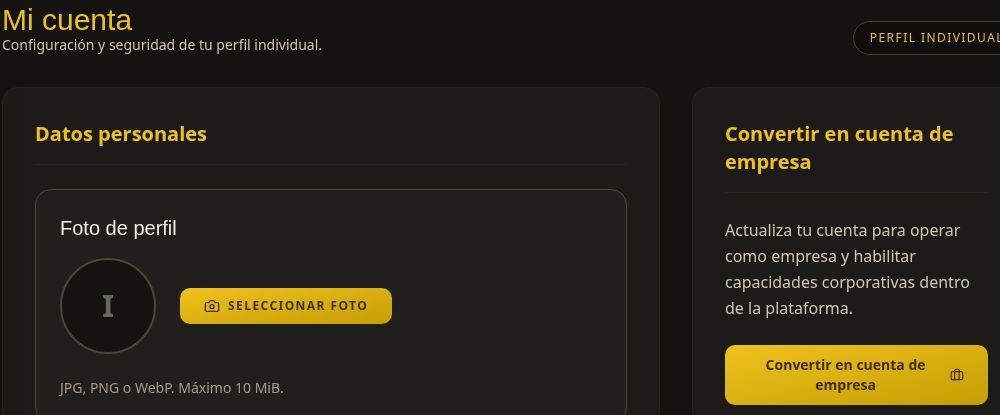
Under Configuración encontrarás la pantalla Mi cuentaSettings, conthe losMy datosaccount yscreen opcionescontains deyour tuindividual perfilprofile individual.details and options.
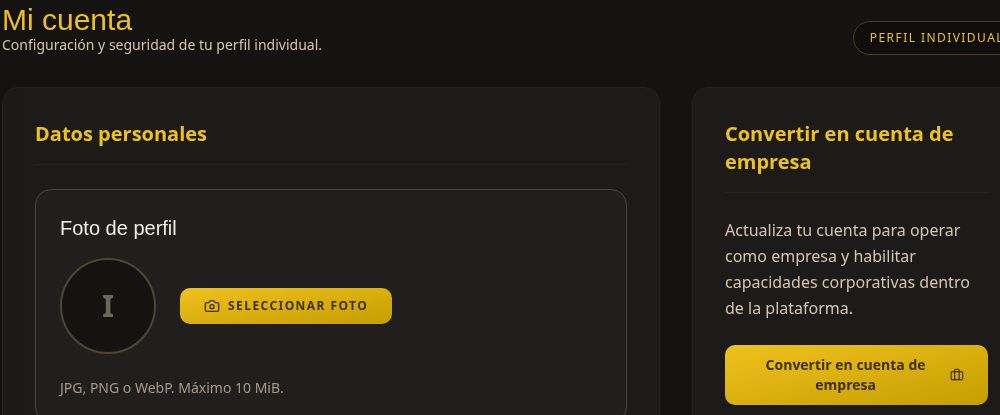
ConsultarReview tuyour perfilprofile
AbreOpenSistemaSystem →ConfiguraciónSettingsoorelselecticonothedegearajustesicondeinlathebarratopsuperior.bar.RevisaReviewlosyourdatospersonalpersonales:details:nombrefullcompleto,name,correo,email,teléfonophone,yandpaíscountrydeofresidencia.residence.ParaToactualizarupdatelayourimagen,photo,pulsaselectSeleccionarChoosefotophoto.LaThepantallascreenadmiteaccepts JPG,PNGPNG,oorWebP,WebPconfilesunupmáximo deto 10 MiB.
SeguridadSecurity yand accesoaccess
La secciónThe SeguridadSecurity yand accesoaccess incluyesection includes CambiarChange contraseñapassword. SigueFollow lasthe indicacionesform delinstructions formulariowhen cuandoyou necesitesneed actualizarlato yupdate conservait, laand nuevakeep contraseñathe denew formapassword privada.private.
CuentaPersonal and business accounts
Convert to business account enables business features. It is not required to review purchases as a personal ybuyer. cuentaCheck dethe empresarequirements before starting this process.
La opciónSelect ConvertirBack ento cuenta de empresadashboard estáto destinadareturn ato habilitarthe capacidadeshome corporativas.screen. You can also change the language using the selector in the top bar.
This screenshot is cropped from the test environment to hide email and phone details. No esaccount necesariadetails parawere consultarchanged tusduring comprasthe como comprador personal. Revisa sus requisitos antes de iniciar ese proceso.review.
Utiliza Volver al panel para regresar al inicio. También puedes cambiar el idioma desde el selector de la barra superior.
Captura recortada del entorno de pruebas para no mostrar correo ni teléfono. No se modificó la cuenta durante la revisión.