
02. Make a deposit before buying
AntesEspañol
Before comprar,buying, necesitasyou saldoneed disponibleavailable enfunds tuin billetera.your Estawallet. guíaThis muestraguide cómoshows crearhow unto depósito manual, adjuntar el comprobante y enviarlocreate a revisión.manual deposit, attach proof of payment, and submit it for review.
EjemploTest de pruebas:example: 5.000USD USD,5,000, referenciareference GAP-9UN24O.9UN24O. LosThe datosbank bancariosdetails mostradosshown sonare ficticiosfictitious yand elthe comprobantereceipt esis unaa simulaciónsimulation sinwith validezno bancaria.banking Novalidity. utilicesDo estosnot datosuse parathese realizardetails pagosto reales.make real payments.
1. AbreOpen HacerMake depósitodeposit
En el menúFrom PagosPayments yand cobroswithdrawals, seleccionaselect HacerMake depósitodeposit. RevisaReview elyour balance, elheld saldobalance, retenidoand yavailable elamount. disponible. PulsaSelect CrearCreate depósitodeposit.
2. SeleccionaChoose laa pasarelapayment ymethod escribeand elenter montothe amount
En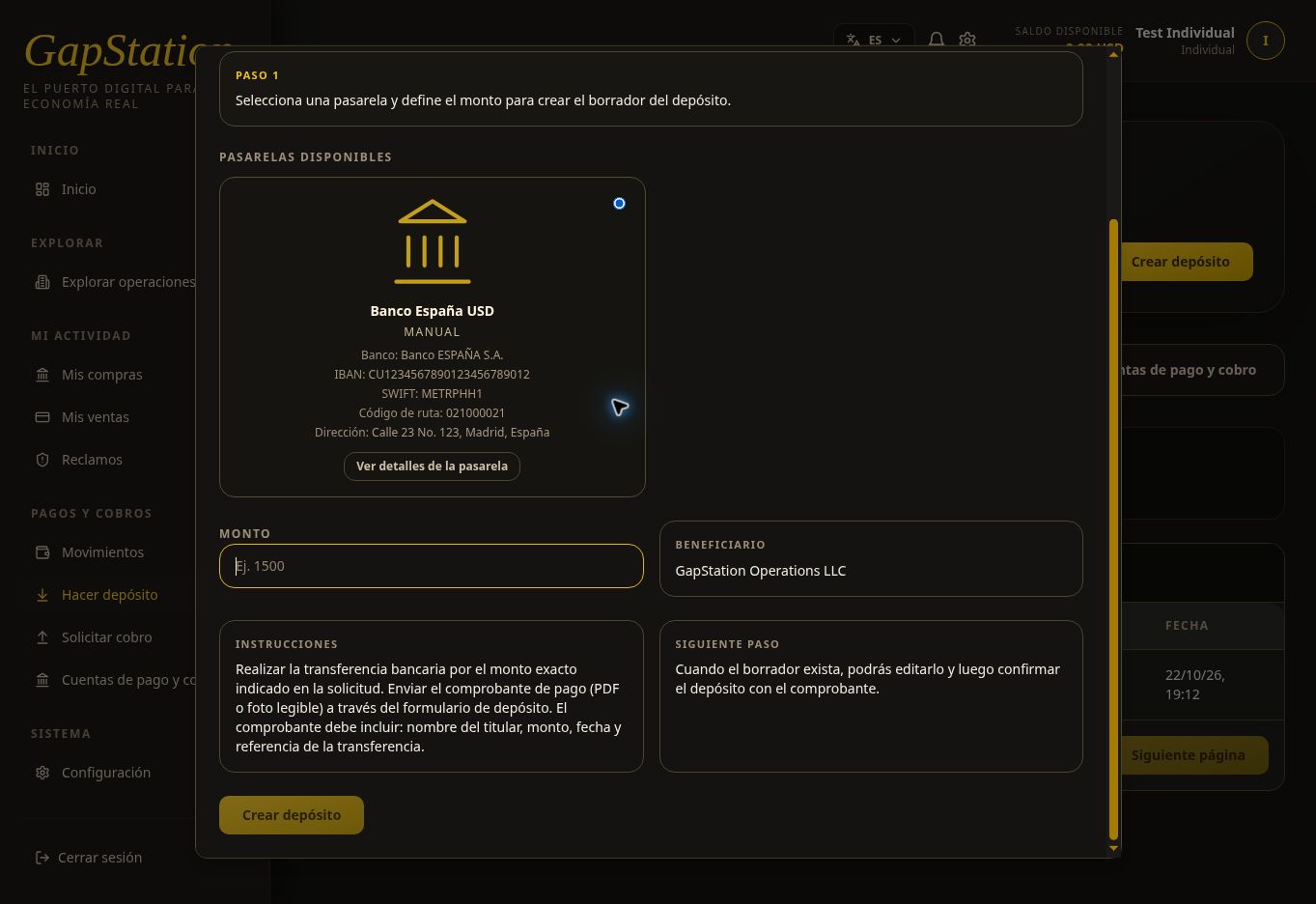
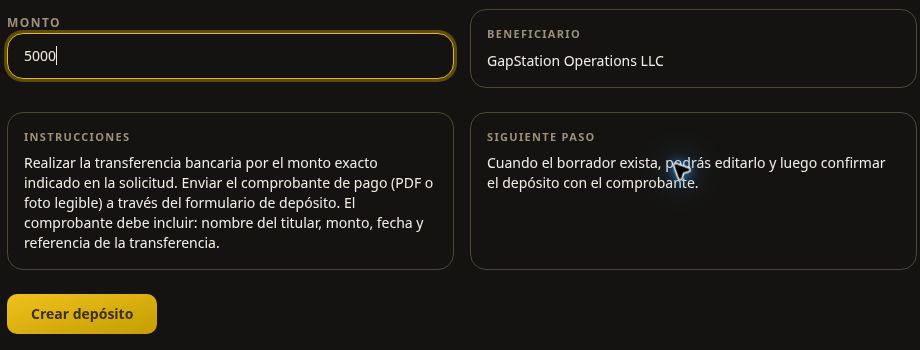
In the popup, seleccionaselect unaan pasarelaavailable disponible.payment Enmethod. esteThis ejemploexample seuses utiliza Banco España USD,USD, dea tipomanual manual.test Revisamethod. elReview beneficiario,the losbeneficiary, datosdestination dedetails, destinoand y las instrucciones. La siguiente captura muestra el formulario de selección de la pasarela.instructions.
IntroduceEnter 5000 enin Amount. Check it and select Monto.Create Verifica el importe y pulsa Crear depósitodeposit una sola vez.
3. RevisaReview elthe borradordraft yand conservakeep lathe referenciareference
El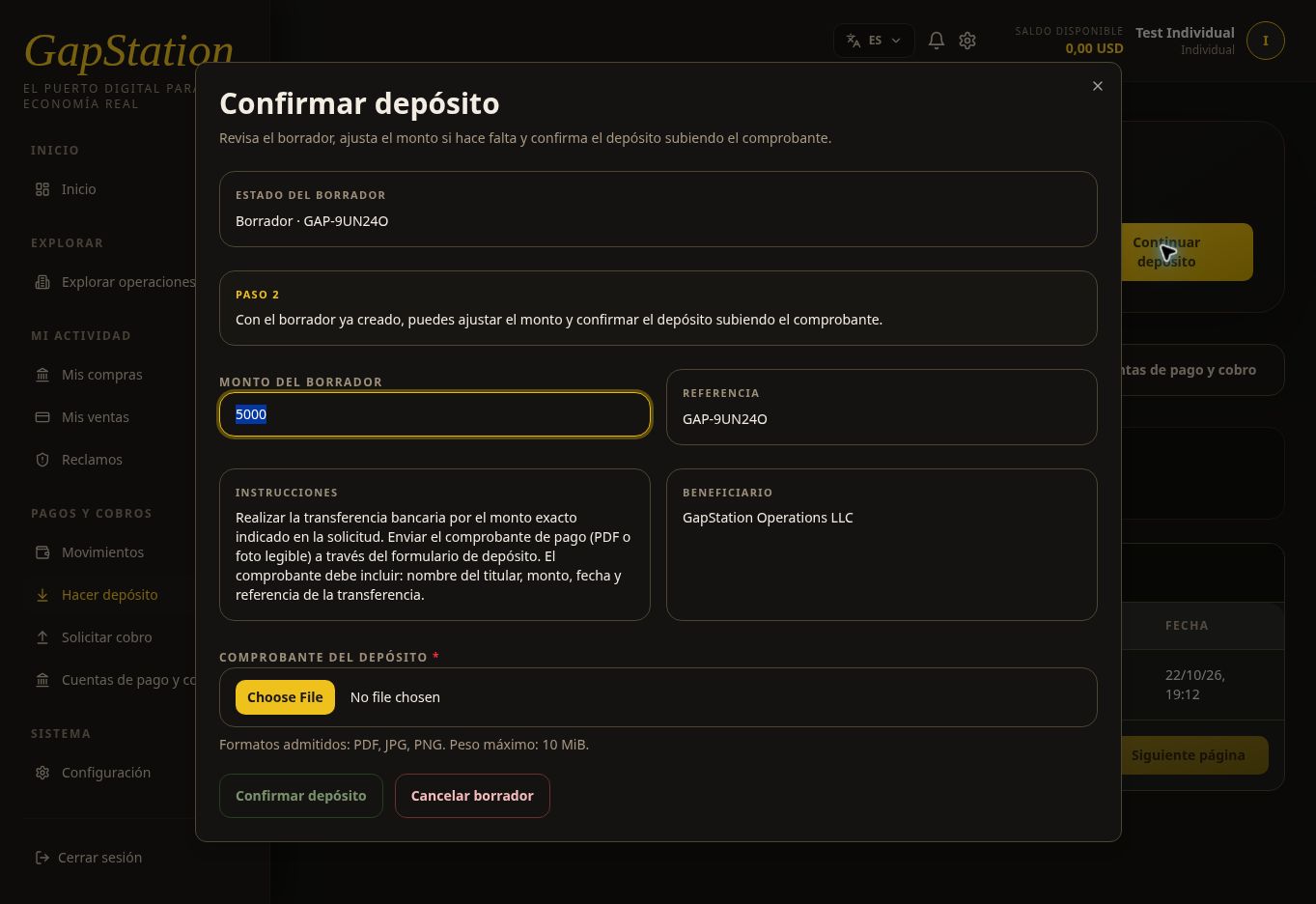
The popup cambiachanges ato ConfirmarConfirm depósito.deposit. ElThis borradordraft dehas este ejemplo tiene la referenciareference GAP-9UN24O yand unan montoamount de 5.000of USD. Conserva5,000. laKeep referenciathe parareference identificarloso enyou elcan historialidentify yit alin consultaryour conhistory soporte.or when contacting support.
Puedescan ajustaradjust elthe montodraft delamount borradorbefore antesconfirming. deIf confirmarlo.you Siclose cierras elthe popup, utilizause ContinuarContinue depósitodeposit parato retomarlo;resume noit; necesitasyou creardo otro.not need to create another one. CancelarCancel borradordraft esis unaa acciónseparate distintaaction defrom cerrarclosing lathe ventana.window.
4. AdjuntaAttach elproof comprobanteof payment
En un depósito real, realiza el pago siguiendo las instrucciones de la pasarela y conserva un comprobante legible con el titular, monto, fecha y referencia de la transferencia. Después pulsa Seleccionar comprobante del depósito y elige el archivo.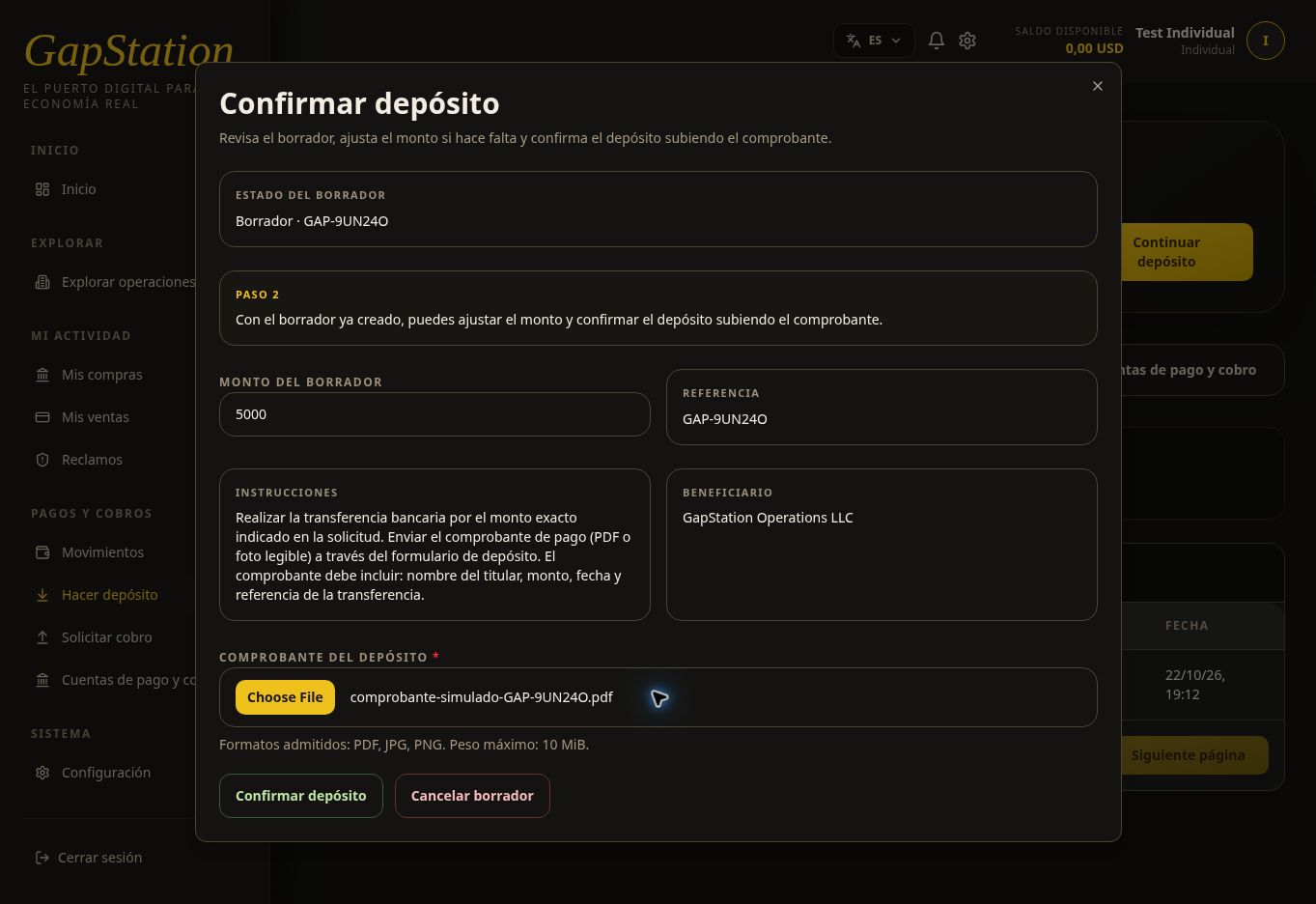
SeFor admitena real deposit, make the payment following the payment method instructions and keep a readable receipt showing the account holder, amount, date, and transfer reference. Then select Select deposit receipt and choose the file.
PDF, JPGJPG, yand PNG, hastafiles up to 10 MiB. Enare estaaccepted. demostraciónThis sedemonstration adjuntóused comprobante-simulado-GAP-9UN24O.pdf,pdf, marcadoclearly expresamentemarked comoas simulación;a simulation; no sereal realizótransfer unawas transferencia real.
5. ConfirmaConfirm yand consultacheck elthe estadopending pendientestatus
Comprueba el monto, la referencia y el archivo seleccionado. Pulsa Confirmar depósito. La solicitud de este ejemplo quedó en estado PENDIENTE y aparece en el historial con el importe y la referencia.
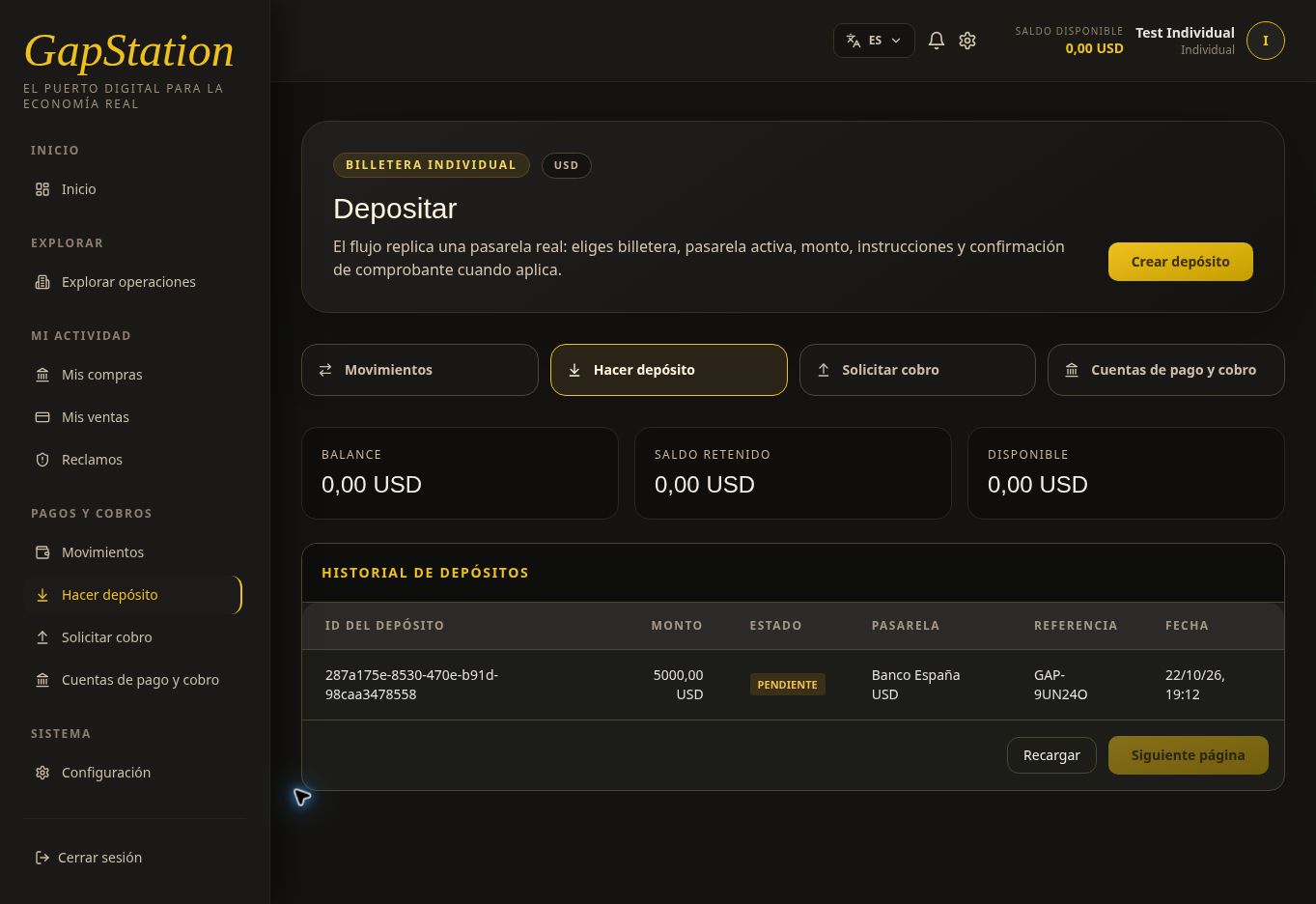
ConfirmarCheck nothe equivaleamount, areference, aprobar.and Enselected estefile. punto el saldo disponible sigue siendoSelect 0,00Confirm deposit. This example entered PENDING status and appears in the history with its amount and reference.
Confirming is not the same as approval. At this point the available balance is still USD: el0.00: depósitothe estádeposit pendienteis dewaiting revisiónfor administrativa.administrative review.
6. CompruebaCheck laapproval aprobaciónand ycredited el saldo acreditadobalance
Cuando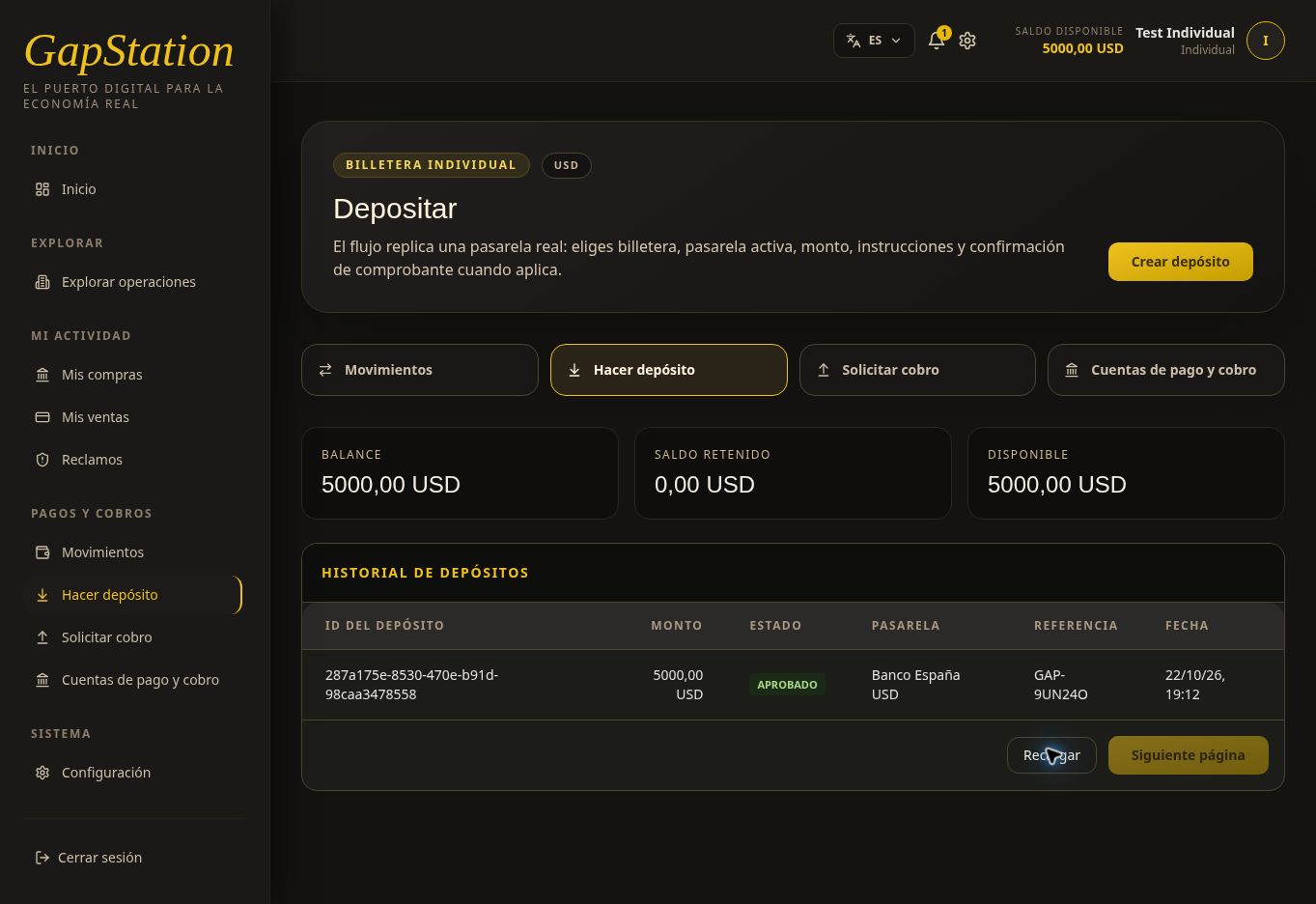
After equipothe apruebeteam elapproves depósito,the consultadeposit, sucheck estadoits enstatus elin historial.the Enhistory. esteIn ejemplo,this laexample, referenciareference GAP-9UN24O changed from PENDING to APPROVED.
Select GAP-9UN24ORefresh pasóto deupdate PENDIENTEthe history. If the status changed but the balance still shows the old amount, reload the full page. In this test the page had to be reloaded for the balances to update as well.
After approval, the balance and available amount show USD 5,000.00, with USD 0.00 held.
Transactions also shows a APROBADO.
Pulsacompleted RecargarFunds received paraentry actualizarfor el+USD historial. Si el estado ya cambió pero el saldo todavía muestra el valor anterior, actualiza la página completa. En esta prueba fue necesario recargar la página para actualizar también los saldos.
Después de la aprobación, el balance y el disponible muestran 5.000,00 USD, con 0,00 USD retenidos.
En Movimientos también se verificó un Ingreso de fondos de +5.000,00 USD en estado COMPLETADA.5,000.00.
7. RevisaCheck lathe notificaciónnotification en la campanitabell
Al aprobarse el depósito, recibes una notificación en la campanita de la barra superior. El indicador numérico señala los avisos no leídos. Pulsa la campanita para abrir Notificaciones.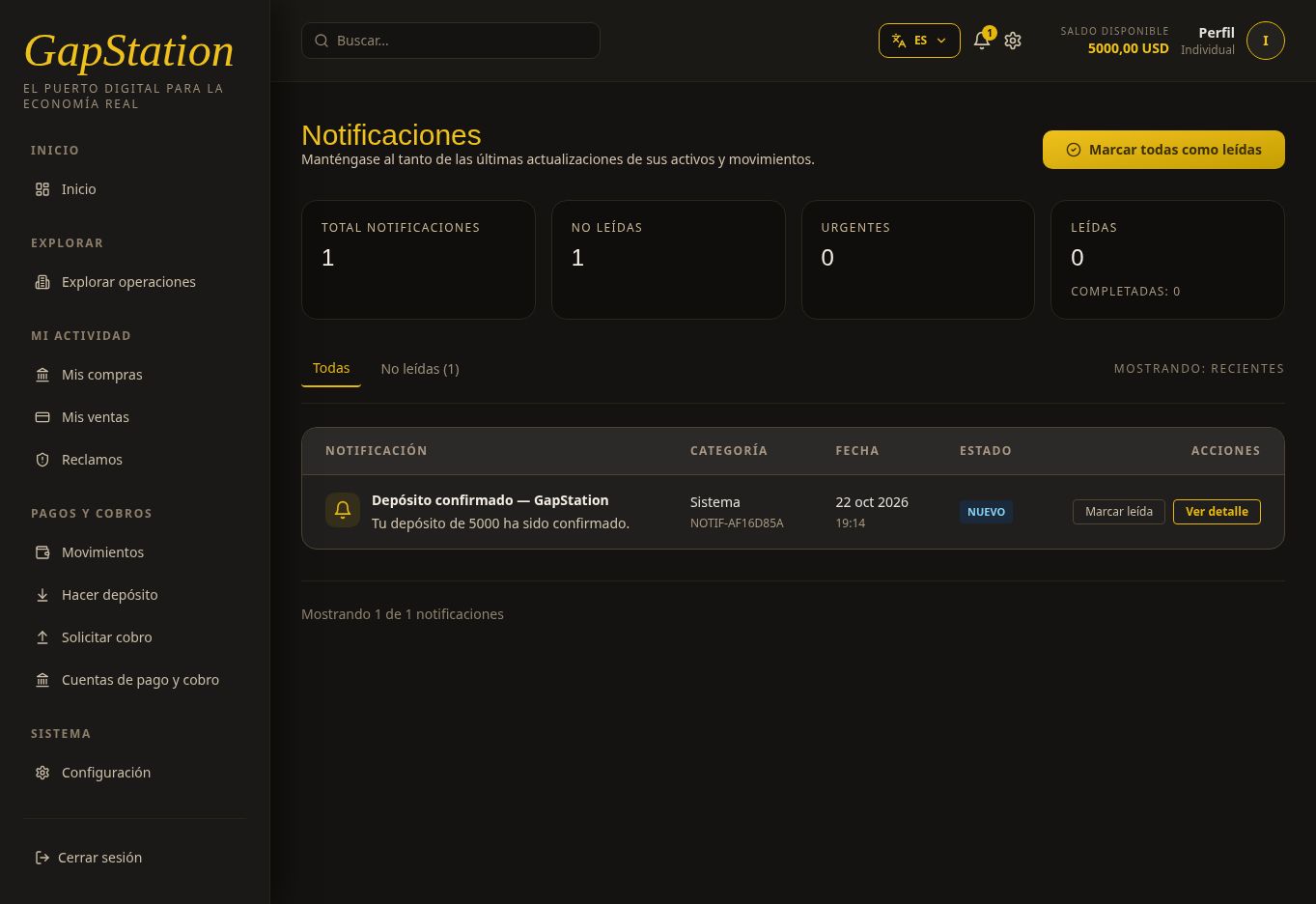
EnWhen estathe demostracióndeposit llegóis approved, you receive a notification in the bell in the top bar. The number indicates unread alerts. Select the bell to open Notifications.
This demonstration received “DepósitoDeposit confirmadoconfirmed — GapStation”, conwith elthe mensajemessage “Tu depósito deYour 5000 hadeposit sidohas confirmado.been confirmed.” Select View details Puedesto utilizaropen the alert or VerMark detalleas read paraafter abrirreviewing el aviso o Marcar leída después de revisarlo.it.
Elexample depósitocompleted dethe esteflow: ejemplo completó el flujo: BORRADORDRAFT → PENDIENTEPENDING → APROBADO.APPROVED. LasThe capturasscreenshots yand elreceipt comprobanteare correspondenfor exclusivamentetesting a una prueba.only.
SiIf necesitasyou ayudaneed help
FacilitaGive asupport soportethe lareference referenciaand ystatus elshown estadoin quethe aparecehistory. enDo elnot historial.post Noreal publiquesreceipts comprobantesor realespersonal nibanking datosdetails bancariosin personalespublic en canales públicos.channels.